network devices
Network devices is the inventory of everything discovery has found on each site's LAN — printers, terminals, switches, access points, cameras, UPSes.
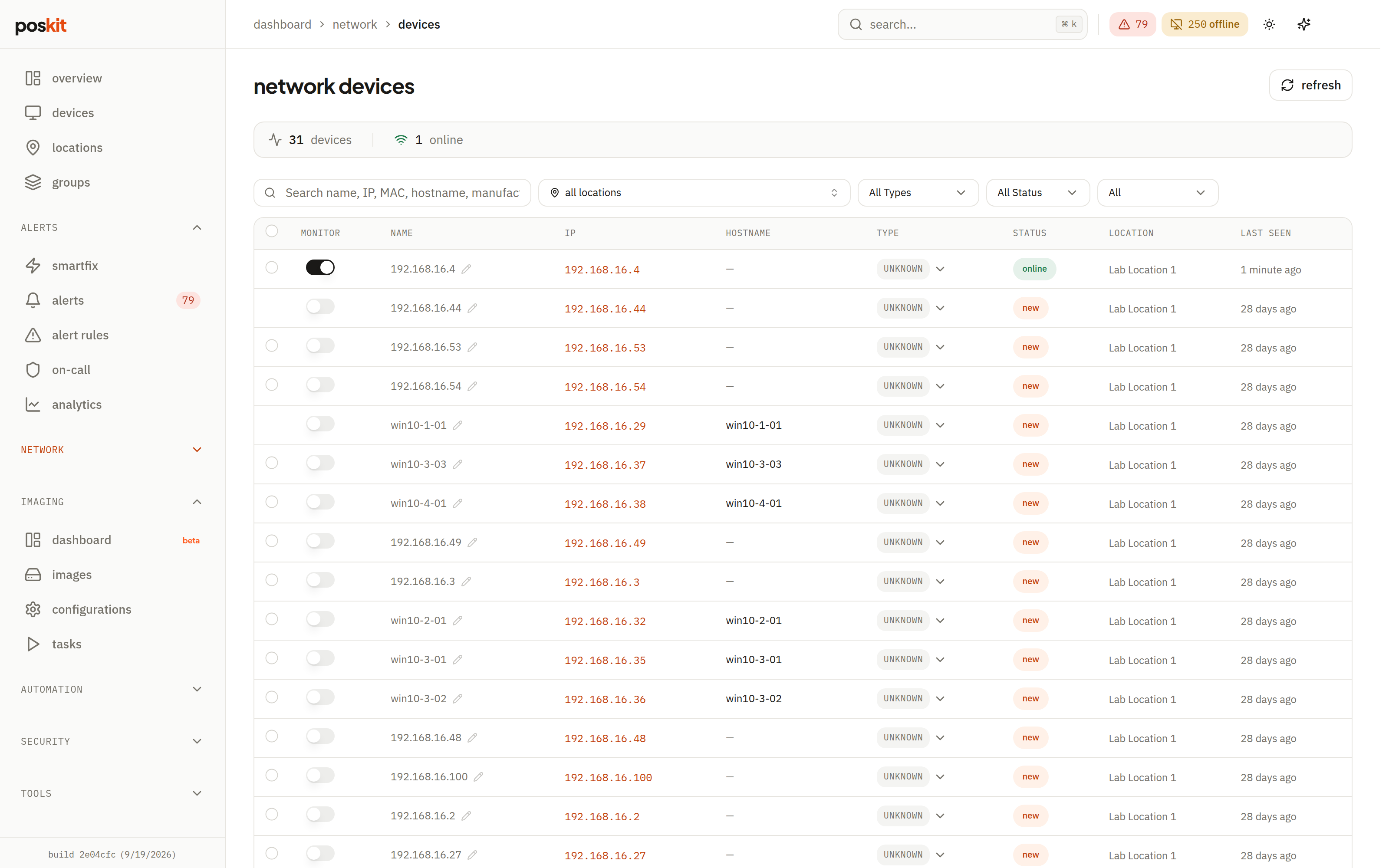
These are not the same thing as your managed devices. A managed device runs the PosKit agent and reports metrics; a network device is something discovery saw on the network, whether or not PosKit has any control over it.
A machine can be both — discovered on the LAN, and running the agent.
what is recorded
| Field | Notes |
|---|---|
| IP address | — |
| MAC address | — |
| Hostname | — |
| Manufacturer | Derived from the MAC prefix |
| Device type | Auto-classified, and correctable |
| Status | — |
| Location | — |
| Last seen | — |
| Open ports | What discovery found listening |
| Display name | Editable inline, for example "Kitchen Printer 1" |
the table
| Column | Notes |
|---|---|
| Checkbox | For bulk actions |
| Monitor | A per-device monitoring switch |
| Name | The display name, editable inline |
| IP | — |
| Hostname | With the manufacturer shown beneath |
| Type | An inline dropdown, so you can correct the classification |
| Status | — |
| Location | — |
| Last Seen | — |
Set the display name as soon as a device is discovered. "Kitchen Printer 1" is a name someone can act on at 8pm on a Friday; an IP address is not.
filters
| Filter | Options |
|---|---|
| Search | Free text across name, IP, MAC, hostname and manufacturer |
| Location | Multi-select |
| Type | — |
| Status | All, Online, Offline, New |
| Monitoring | All, Monitored, Unmonitored |
Bulk actions apply to the current selection, and Deploy Agent is available both per device and in bulk. See agent deployment.
auto-classification
Discovery guesses what each device is. It gets it right often enough to be useful and wrong often enough that the Type column is an editable dropdown.
Two signals feed the guess.
open ports
| Ports | Classified as |
|---|---|
| 9100, 515, 631 | Receipt printer |
| 161 (SNMP) | Switch |
| 554, 8554 (RTSP) | Camera |
| 3493 | UPS |
| Database ports | Server |
MAC manufacturer prefix
| Manufacturer | Classified as |
|---|---|
| Ingenico, Verifone | Payment terminal |
| Epson, Star Micronics, Bixolon | Receipt printer |
| Cisco, Netgear | Switch |
| Ubiquiti, Aruba, Ruckus, Meraki | Access point |
| TP-Link | Router |
| APC | UPS |
| Oracle-Micros, NCR, Toshiba | POS terminal |
| Dell, HP | Workstation |
| Hikvision | Camera |
Classification is a heuristic, not a fact the device reported about itself. A workstation with a database listening on it can be classified as a server; a device from a manufacturer not in the list may not be classified at all.
Correct it in the Type dropdown. That correction is what makes the type filter trustworthy afterwards.
Work through the classifications once after your first scan at a site, rather than leaving them. Type is a filter and a grouping used elsewhere, so an estate where types are wrong quietly degrades everything built on top of them.
monitoring
The Monitor toggle controls whether a discovered device is monitored per device. Turning it on for the kit that matters — the printers and terminals a site cannot trade without — keeps the noise down compared with monitoring everything discovery happened to find.